
This page is the public record of how Ropayo customers consent to receive text messages. It is here for two audiences: customers who want to see what they agreed to, and the mobile carriers who review our messaging program and cannot sign in to a customer account.
This page does not collect phone numbers and nothing on it signs anyone up for text messages. The only way to opt in is described below.
The program
- Program name. Ropayo Order Notifications.
- What we send. Transactional messages about your own orders only — pickup and delivery status, and problems with payment for an order. We do not send marketing or promotional text messages.
- Message frequency. Varies with your order activity — typically a few messages per order.
- Cost. Message and data rates may apply. Ropayo does not charge for these messages; your mobile carrier's rates apply.
- Help and opt out. Reply HELP for help, STOP to opt out.
How you opt in
There is one opt-in path, and it is the same in your browser at app.ropayo.com and in the Ropayo app. Text messages are off by default on every new account:
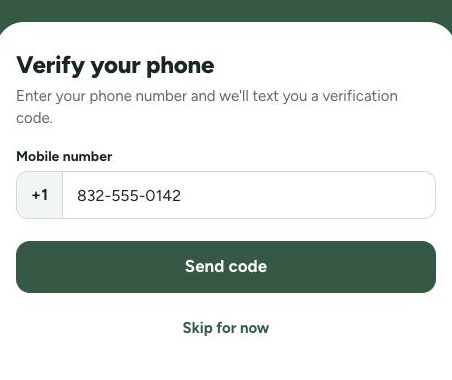
- Create a Ropayo account and verify your mobile number with a one-time passcode sent to that number.
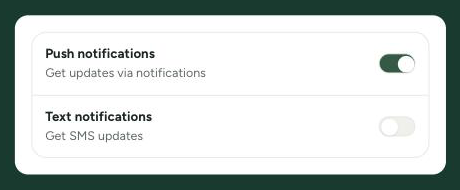
- Open Profile → Notifications. The Text notifications switch is off.
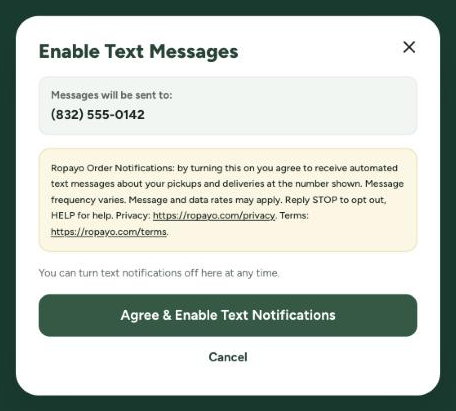
- Turn the switch on. It does not take effect yet — a confirmation window titled “Enable Text Messages” opens instead, showing the mobile number the messages would go to and the disclosure quoted below.
- Press “Agree & Enable Text Notifications” to consent. Pressing Cancel closes the window and leaves text messages off.
Consent is never required to create an account, schedule a pickup, or place an order. When you consent we record the date and time, the device you used, and the version of the policy shown to you, so we can show that you asked for these messages.
What you agree to
This is the disclosure displayed next to the consent button, word for word. It is the same text we store on your consent record:
Ropayo Order Notifications: by turning this on you agree to receive automated text messages about your pickups and deliveries at the number shown. Message frequency varies. Message and data rates may apply. Reply STOP to opt out, HELP for help. Privacy: https://ropayo.com/privacy. Terms: https://ropayo.com/terms.
What the customer sees
The three screens of the opt-in, in order, captured from app.ropayo.com. The mobile number shown throughout is the placeholder (832) 555-0142, from the 555-01 range reserved for fictional use; on the live screens it is the customer's own number. Nothing else in these images is altered.
Step 1 — the customer enters their mobile number
The number is typed into the Mobile number field at sign-up and confirmed with a one-time passcode. A number that has not been confirmed this way is never sent a message.
Step 2 — text messages are off by default
In the signed-in account, under Profile → Notifications, the Text notifications switch starts off. Nothing is sent unless the customer turns it on.
Step 3 — the customer agrees, with the number in front of them
Turning the switch on does not enable messages. This window opens first, showing the confirmed number under “Messages will be sent to:” directly above the consent language, with “Agree & Enable Text Notifications” and Cancel. Consent is only recorded when the customer presses the agree button.
How to opt out
Reply STOP to any message, or turn the Text notifications switch off under Profile → Notifications. You will receive one confirmation message after replying STOP. Opting out of text messages does not affect your account, your orders, or email and in-app notifications.
Reply HELP to any message, or email support@ropayo.com, for help. Carriers are not liable for delayed or undelivered messages.
In our policies
The same terms appear in our Privacy Policy (SMS notifications) and our Terms & Conditions (SMS notification program). No mobile information will be shared with third parties or affiliates for marketing or promotional purposes. All other categories exclude text messaging originator opt-in data and consent; this information will not be shared with any third parties.